> ## Documentation Index
> Fetch the complete documentation index at: https://docs.dorafiles.com/llms.txt
> Use this file to discover all available pages before exploring further.
# Agent Mode
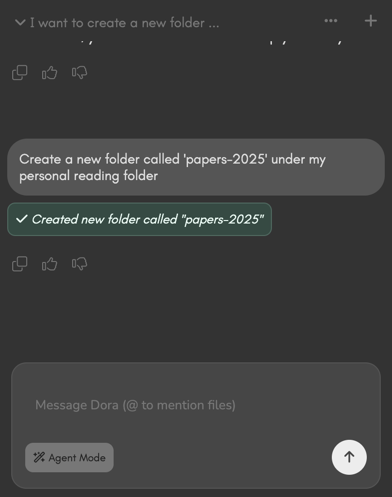 Agent-Mode is Dora's automated agent. When `Agent-Mode` is turned on, Dora is able to perform file operations on your behalf.
`Agent-Mode` is disabled by default. To enable it whenever you want, simply click on the `Agent-Mode` toggle in your chat input box.
Dora will never delete files on Agent-Mode.
## Available Actions
Let's you create a folder.
Example prompt: "create a folder called 'pics' in my Vacations folder.
Move or rename files and folder.
Example prompt: "Move my the meeting notes to my Meetings folder".
Copy files and folders.
Example prompt: "Duplicate my to-do and save it as to-do-v2".
Create files.
Example prompt: "Summarize this text and save it as a file called 'summary-may.md' at my base directory".
Navigate the explorer to a specific folder.
Example prompt: "Can you go to my reports folder".
Agent-Mode is Dora's automated agent. When `Agent-Mode` is turned on, Dora is able to perform file operations on your behalf.
`Agent-Mode` is disabled by default. To enable it whenever you want, simply click on the `Agent-Mode` toggle in your chat input box.
Dora will never delete files on Agent-Mode.
## Available Actions
Let's you create a folder.
Example prompt: "create a folder called 'pics' in my Vacations folder.
Move or rename files and folder.
Example prompt: "Move my the meeting notes to my Meetings folder".
Copy files and folders.
Example prompt: "Duplicate my to-do and save it as to-do-v2".
Create files.
Example prompt: "Summarize this text and save it as a file called 'summary-may.md' at my base directory".
Navigate the explorer to a specific folder.
Example prompt: "Can you go to my reports folder".